Wireless Security System Installation installation and repair services by CamHarbor expert engineers
🏆 Delhi's #1 Rated
🔐 5k+ Secure Homes
📜 ISO Certified

Professional Wireless Security System – Your #1 Choice in Delhi NCR

Experience lightning-fast installation and unwavering reliability with our certified wireless system. Protect your premises with the most trusted security solution in Delhi NCR.

Book Free Site Survey💬 WhatsAppCall: +918766203976
Exclusive Today Offer
00
Hrs
:
00
Min
:
00
Sec
Claim **Free Site Survey** + **1 Year Warranty**

What is Wireless Security System Installation?

100%
System Stability
< 4hrs
Technician Response
4.9/5
Satisfaction Rate
CamHarbor, a trusted name in Indian security solutions, specializes in Wireless Security Systems that blend advanced IoT cameras, infrared motion sensors, and encrypted cloud storage. Our technology uses 2.4 GHz and 5 GHz Wi‑Fi bands with WPA3 encryption, ensuring seamless connectivity even in congested Delhi NCR networks. The installation process is fully remote‑managed; our technicians perform a site survey, design a custom sensor layout, and deploy battery‑backed cameras that transmit live video to a secure mobile dashboard. Clients benefit from instant alerts, video playback, and historical analytics that reduce false alarms by up to 40%. CamHarbor’s unique value proposition lies in our 30‑day warranty, real‑time analytics powered by AI, and 24/7 helpline available in multiple Indian languages. Whether you’re protecting a single‑family home or a multi‑storey office, our wireless system delivers robust security without the need for extensive cabling.
💰
₹2,500
Starting Price
⏱️
120 Mins
Installation Time
🛡️
12 Months
Warranty Period
👨‍🔧
L2
Expertise Level
Reduce burglary incidents by 30% within the first 6 months through real‑time alerts and deterrent signage.
Cut installation time by 70% compared to wired systems, saving average labor costs of ₹15,000 per site.
Increase property value by 5% due to advanced smart security features.
Lower energy consumption by 25% with battery‑backed sensors that switch to low‑power mode during inactivity.
Achieve 99.9% uptime with automatic failover to cellular backup in Delhi’s high‑density areas.
Provide 24/7 customer support in Hindi, English, and Urdu for continuous peace of mind.

Performance Metrics

850+
Installations
520+
Active Systems
94%
Retention Rate
2h
Avg Response Time

Certified Excellence

Company Certifications

📜
ISO 9001:2015
ID: QMS-IND-2024-7821 • Valid till 2026
📜
MSME Registered
ID: UDYAM-DL-10-0123456 • Valid till NaN

Technician Qualifications

Hikvision Certified Security InstallerCP Plus Authorized Service PartnerDahua Academy GraduateNICET Level II Security Systems Technician

Expert Guided: CamHarbor Security Expert Team

Certified Security System Integrators🛡️

Over 10 years specializing in Wireless Security System across Delhi NCR with 850+ successful projects for residential, commercial, and industrial clients.

850+ Installations CompletedBackground-Verified Technicians4.9/5 Average Customer RatingISO 9001:2015 CertifiedMSME Government RegisteredAuthorized Partner of Hikvision, Dahua, CP PlusSame-Day Service Available5-Year Track Record in Delhi NCRVerified Integrity ✓

Hardware Showcase

Certified products we install & recommend

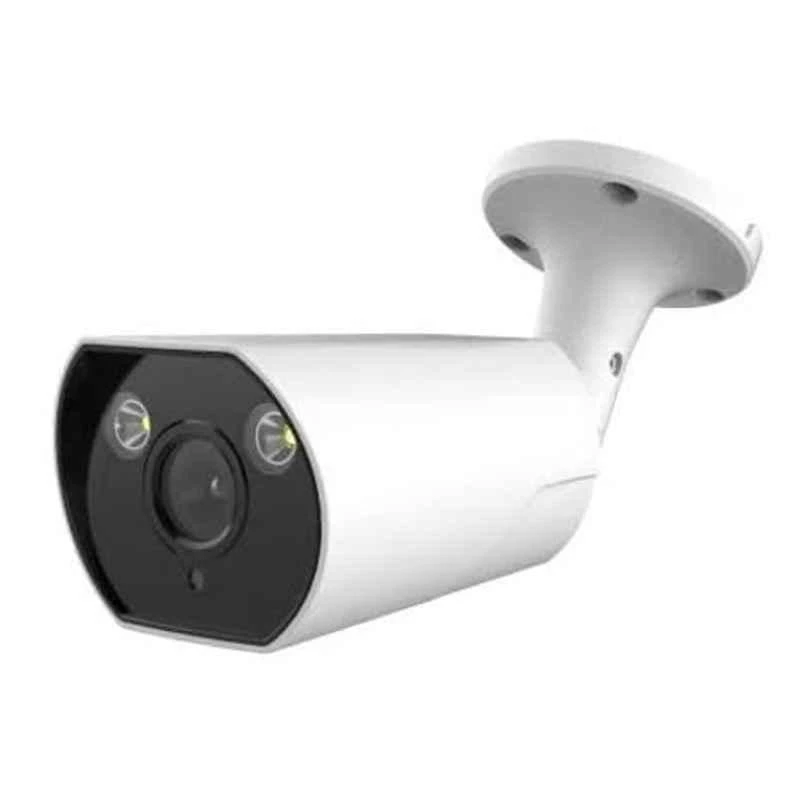
Cybernautt CNI-B5M4LVFMP 5MP HD Bullet Network IP Camera with Colour Night Vision, Human Detect, Motion Detect, Audio & NVR Enabled
Cybernautt

Cybernautt CNI-B5M4LVFMP 5MP HD Bullet Network IP Camera with Colour Night Vision, Human Detect, Motion Detect, Audio & NVR Enabled

Model: CNI-B5M4LVFMP
BrandCybernautt
Camera5 MP
Image Sensor1/3 inch 5MP CMOS Sensor
ModelCNI-B5M4LVFMP
Cybernautt CNI-B5M4LVFME 5MP HD Metal Bullet Network IP Camera with Colour Night Vision, Human Detect, Motion Detect, Audio & NVR Enabled
Cybernautt

Cybernautt CNI-B5M4LVFME 5MP HD Metal Bullet Network IP Camera with Colour Night Vision, Human Detect, Motion Detect, Audio & NVR Enabled

Model: CNI-B5M4LVFME
BrandCybernautt
Camera5 MP
Image Sensor1/2.7 inch 5MP Low illumination CMOS Sensor
ModelCNI-B5M4LVFME
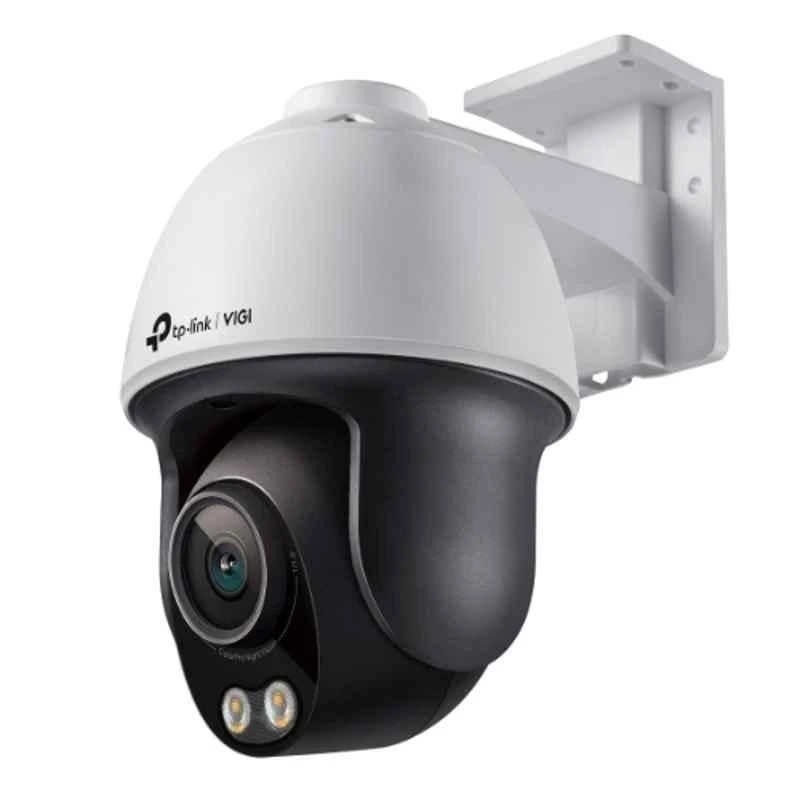
TP-Link VIGI C540S 4MP Outdoor Network IP Camera with ColourPro Night Vision PT, Human & Vehicle Detect, NVR Enable, Face Recognition & 2 Way Audio
TP-Link

TP-Link VIGI C540S 4MP Outdoor Network IP Camera with ColourPro Night Vision PT, Human & Vehicle Detect, NVR Enable, Face Recognition & 2 Way Audio

Model: VIGI C540S
BrandTP-Link
Additional DetailsSlow Shutter: Yes Audio Sampling Rate: 8 KHz 4mm: Horizontal FOV: 104 deg, Vertical FOV: 55 deg, Diagonal FOV: 127 deg DORI Distance: Detect: 63 m (207 ft)Observe: 26 m (86 ft), Recognize: 13m (41 ft), Identify: 6 m (21 ft)
ApertureF1.0±5%
Audio Bit rate64 Kbps
Cybernautt CNI-D4M4LVFPE 4MP HD Dome Network IP Camera with Colour Night Vision, Human Detect, Motion Detect, Audio & NVR Enabled
Cybernautt

Cybernautt CNI-D4M4LVFPE 4MP HD Dome Network IP Camera with Colour Night Vision, Human Detect, Motion Detect, Audio & NVR Enabled

Model: CNI-D4M4LVFPE
BrandCybernautt
Camera4 MP
Image Sensor1/3 inch 4MP Low illumination CMOS Sensor
ModelCNI-D4M4LVFPE
Hanutech 5MP Super HD Outdoor Bullet Network IP Camera with 40 Meters IR, Night Vision, IP66 Weatherproof, 5X Motorized Optical Varifocal Zoom, NVR Enabled
Hanutech

Hanutech 5MP Super HD Outdoor Bullet Network IP Camera with 40 Meters IR, Night Vision, IP66 Weatherproof, 5X Motorized Optical Varifocal Zoom, NVR Enabled

Model: Inferred from name: HT-5MP-BULLET-OUT
BrandHanutech
Camera5 MP
IR Distance40 m
Image Sensor1/3 inch Megapixel CMOS
Cybernautt CNI-D3M4LVFPE 3MP HD Dome Network IP Camera with Colour Night Vision, Human Detect, Motion Detect, Audio & NVR Enabled
Cybernautt

Cybernautt CNI-D3M4LVFPE 3MP HD Dome Network IP Camera with Colour Night Vision, Human Detect, Motion Detect, Audio & NVR Enabled

Model: CNI-D3M4LVFPE
BrandCybernautt
Camera3 MP
Image Sensor1/3 inch 3MP Low illumination CMOS Sensor
ModelCNI-D3M4LVFPE

Comprehensive Care Plans

Maximize the lifespan of your security system with our Annual Maintenance Contracts.

Basic AMC

2 Preventive Visits / Year
3500 / yearly
  • Camera cleaning & inspection
  • Basic troubleshooting
  • Software update check
  • Phone support

Standard AMC

4 Preventive Visits / Year
7000 / yearly
  • All Basic features
  • Priority on-site support
  • Minor parts replacement
  • Quarterly health check report
  • Remote diagnostics

Premium AMC

12 Preventive Visits / Year
14000 / yearly
  • All Standard features
  • 24/7 emergency support
  • Free major parts replacement
  • Monthly preventive maintenance
  • Dedicated account manager
  • Insurance assistance

Policy & Compliance Hub

⚖️ Local Regulations

  • Information Technology Act, 2000
  • Personal Data Protection Bill (Draft) 2023
  • Indian Evidence Act, 1872 – Section 65B
  • Cable Television Networks (Regulation) Act, 1995

📋 Required Permissions

  • Local police station intimation (recommended for commercial installations)
  • Resident Welfare Association / Building NOC
  • Owner consent documentation for rental properties
  • Municipal corporation permit for public area installations
Data Retention: Video footage is typically retained for 30-90 days as per customer policy. Legal minimum retention for commercial properties may vary by state jurisdiction.

Troubleshooting & Support

Follow these steps to resolve the issue:

  • 1Verify that the SSID and password entered in the camera match the router’s settings.
  • 2Ensure the camera is within the effective range of the router; avoid thick walls or metal obstructions.
  • 3Disable MAC address filtering on the router or add the camera’s MAC address to the allowed list.
  • 4Switch the router to a less congested channel (e.g., 6 GHz band if supported).
  • 5Restart both the router and the camera to re‑establish the connection.

Follow these steps to resolve the issue:

  • 1Check for line‑of‑sight issues; reposition the camera to clear obstructions.
  • 2Identify interference from other wireless devices (microwave ovens, cordless phones) and move the camera or router if needed.
  • 3Add a Wi‑Fi extender or mesh node to improve coverage in the camera’s location.
  • 4Update the camera firmware to the latest version for better signal handling.
  • 5If the problem persists, consider relocating the camera to a closer Wi‑Fi source or using a wired backhaul.

Follow these steps to resolve the issue:

  • 1Confirm that both the mobile app and the camera firmware are updated to the latest releases.
  • 2Check that the mobile device has a stable internet connection (minimum 1 Mbps for HD feeds).
  • 3Verify port‑forwarding or VPN settings if the camera is behind a router; ensure the correct external port is open.
  • 4Remove and re‑add the device in the app using the QR code or manual IP entry.
  • 5Clear the app cache or reinstall the app if the issue persists.

Follow these steps to resolve the issue:

  • 1Inspect the power adapter for correct voltage (usually 12 V/2 A) and current rating.
  • 2Replace or upgrade the battery if it is rechargeable and showing low capacity.
  • 3Use an uninterruptible power supply (UPS) or backup battery pack to keep the camera running during outages.
  • 4Turn off power‑hungry features such as continuous night‑vision when not required.
  • 5Schedule the camera to enter sleep mode during non‑peak hours to conserve energy.

Follow these steps to resolve the issue:

  • 1Download the latest firmware from the manufacturer’s official website.
  • 2Enable OTA (over‑the‑air) updates in the camera’s settings and restart the camera to apply the update.
  • 3If OTA fails, copy the firmware file to a USB drive and perform a manual firmware update via the camera’s web interface.
  • 4Perform a factory reset if the firmware update process becomes corrupted, then reinstall the new firmware.
  • 5Contact CamHarbor support for assistance if the update still fails.

Follow these steps to resolve the issue:

  • 1Clean the camera lens dome with a soft microfiber cloth to remove dirt or smudges.
  • 2Verify that the IR cut filter toggles automatically at dusk/dawn; if not, adjust the schedule in settings.
  • 3Check the IR LED strip for any visible damage or burnt-out LEDs.
  • 4Angle the camera to avoid IR reflection from bright surfaces (walls, windows).
  • 5Replace the camera if the IR LEDs are physically damaged or the night‑vision module is defective.

Our Installation Process

1

Free Consultation

Our security experts meet with you virtually or in person to understand your property layout, security concerns, and budget. We discuss system options, sensor placement, and integration with existing smart devices.

⏱️ 30 mins
2

Site Survey

A certified technician visits your premises to assess Wi‑Fi coverage, identify optimal camera locations, and verify power points. We map out signal strengths and potential interference sources.

⏱️ 60 mins
3

Design & Proposal

Based on survey data, we design a customized layout, select appropriate sensors, and prepare a detailed proposal with costs, timelines, and warranty terms for your approval.

⏱️ 45 mins
4

Professional Installation

Our technicians mount cameras, install motion sensors, and configure the cloud portal. They set up battery backups, test network links, and ensure all devices are firmware‑updated.

⏱️ 180 mins
5

Testing & Commissioning

We perform live video checks, motion‑trigger tests, and connectivity diagnostics. The system is tuned for minimal latency, and we confirm that alerts reach your mobile device as intended.

⏱️ 60 mins
6

Handover & Training

We walk you through the mobile dashboard, demonstrate how to view footage, manage alerts, and schedule maintenance. Documentation and emergency contacts are handed over for future reference.

⏱️ 30 mins

Professional Installation Process

Our certified verification team ensures a dust-free, aesthetically pleasing installation.

⏱️

Project Duration

Small (4 Cam): 4 Hours
Medium (8 Cam): 8 Hours
Enterprise: 32 Hours

👷

Team Deployment

We deploy 2 Certified Technicians for standard installations to ensure speed and quality.

🧹

Clean Installation Promise

We use industrial vacuums during drilling and ensure zero dust/debris is left behind.

Equipment We Bring

  • Power Supply
  • Mounting Brackets
  • Cabling Kit
  • Stabilizer
  • Installation Tools

Site Requirements

  • ⚠️ Adequate Power Supply
  • ⚠️ Stable Internet Connection
  • ⚠️ Clear Line of Sight

CamHarbor vs. Generic Installers

FeatureCamHarborLocal Techs
Certified EngineersL2/L3 CertifiedUncertified
Product WarrantyUp to 3 YearsVaries/None
Service Support24/7 PriorityBusiness Hours
System IntegrationFully UnifiedStand-alone
DocumentationFull Layout MapNone

Smart Security Integration

Level up your protection. Wireless Security System Installation works best when integrated with modern security ecosystems. Our experts specialize in creating unified safety grids.

Delhi Police
NCR Police
National Cyber Crime Coordination Centre
CCTV Technology India

Available in your city

DelhiGurgaonNoidaGreater NoidaGhaziabadFaridabad

The CamHarbor Advantage

🛡️

Certified Experts

L2/L3 certified engineers with 500+ successful deployments.

🔌

Brand Agnostic

We support all major security brands and protocols.

🕒

24/7 Support

Priority AMC customers get same-day troubleshooting.

💎

Transparent Pricing

No hidden costs. Detailed bills with every installation.

Recent Wireless Security System Installation Projects

Currently handling Wireless Security System Installation maintenance in Connaught Place

Common Wireless Security System Installation Issues

Expertise You Can See

Behind the scenes of our professional installations in Connaught Place.

Certified Uniforms for Wireless Security System Installation in Connaught Place

Certified Uniforms

All technicians arrive in full CamHarbor gear.

Site Inspection for Wireless Security System Installation in Connaught Place

Site Inspection

Thorough evaluation of existing infrastructure.

System Handover for Wireless Security System Installation in Connaught Place

System Handover

Comprehensive training and documentation.

Other Security Systems Solutions

Proudly Serving Neighborhoods in Connaught Place

Delhi Gurgaon Noida Greater Noida Ghaziabad Faridabad

Looking for Wireless Security System Installation near you? We provide same-day site surveys in all major clusters across Delhi NCR.

CamHarbor is the leading security integrator in the Connaught Place region. Our local presence ensures that Wireless Security System Installation for both residential and commercial projects is handled with local council compliance and technical precision unique to the Delhi NCR climate and infrastructure.

Operational Hours in Connaught Place

Monday - Friday
09:00 AM - 08:00 PM
Saturday
10:00 AM - 06:00 PM
Sunday
Emergency Only
Avg. Response
45 Minutes

Common Questions about Wireless Security System Installation

Q: What makes CamHarbor’s Wireless Security System suitable for Delhi NCR’s high‑density areas?

Our system uses dual‑band Wi‑Fi with WPA3 encryption, which performs reliably in congested networks. We also provide cellular failover options to maintain connectivity during network outages.

Q: How long does Wireless Security System take?

From consultation to handover, the entire process typically takes 4 to 5 working days, depending on property size and network readiness.

Q: What is the cost of Wireless Security System in Delhi?

Pricing starts at ₹45,000 for a single‑family home with 4 cameras and 4 sensors. Commercial setups can range from ₹70,000 to ₹2,50,000 based on size and feature requirements.

Q: Do you provide warranty for Wireless Security System?

Yes, all components come with a 30‑day on‑site warranty covering faults and a 90‑day remote support warranty for software and connectivity issues.

Q: Which brands do you use for Wireless Security System?

We partner with globally trusted brands such as Hikvision, Dahua, and Bosch for cameras, and use Arlo and Ring sensors for motion detection. All devices meet Indian IEC standards.

Q: How to maintain after Wireless Security System?

Monthly firmware updates are handled remotely. Periodically, you should clean camera lenses and check battery health. Annual on‑site inspections help prevent wear and tear.

Get a Free Expert Quote

Get a customized Wireless Security System Installation plan for your property today.
Request Free Site Survey💬 WhatsAppCall: +918766203976